

The Illusion of Vision
When you look at the world, your perception of sight feels instant. Your ability to recognise shapes, colors, and motion seems effortless and hardwired.
Humans and countless other life forms share this impressive ability.
Computers, on the other hand, don’t have it so easy. They don’t have eyes and lack the biological machinery we use to make sense of visual scenes.
Yet, somehow, they see!
They navigate roads [Clip], sort objects on factory lines [Clip], analyze medical scans [Clip], even unlock your phone with help from facial recognition technology[ Clip].
So, what’s really going on here?
How are computers able to see?
This explainer unpacks how computers simulate the biological process of “seeing”, using mathematical principles.
Step One: Turning Light into Numbers
First, every digital image starts as a grid of tiny squares called pixels. Each pixel corresponds to values from the readings of light-sensitive components in a device (e.g., a digital camera) that output numerical values based on the intensity of light at the moment of capture.
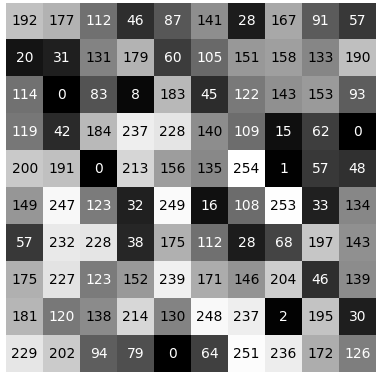
A computer doesn’t perceive cats, trees, and faces like we do. It sees numbers and the patterns they make.
Here is a simple case study:
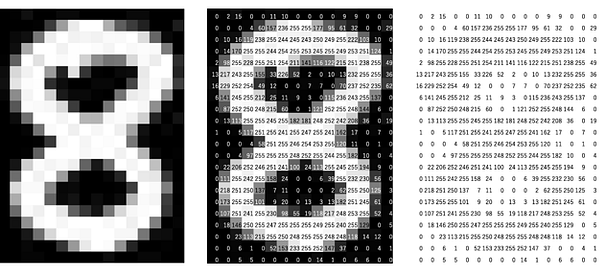
The image above shows how every pixel holds a unique value. These values represent a pixel’s brightness, color, depth, even infrared intensity.
For the computer, an image is simply a matrix of values. Imagine a spreadsheet with thousands or millions of cells.
That’s what it sees!
When you show a computer a photograph, its “first impression” is basically:
“Here is a 1920 × 1080 array of numbers”!
And what it does with all those numbers?
Well, that’s entirely up to the instructions it’s programmed to execute.
Step Two: Extracting Patterns from Chaos
To make good use of the raw pixels now represented by numbers, computers search for patterns.
This starts with simple mathematical guesses:
- Edges → Are there sharp changes in pixel values?
- Corners → Where do“edges” meet?
- Textures → Are there repeated patterns of pixel values?
- Color blobs → Are there areas with similar pixel values?
These guesses are a computer’s preliminary attempt at visualizing our world.

Try squinting your eyes until the objects around you look blurred.
Can you observe that the details on these objects are lost and all you can perceive are the shapes their outlines make?
That’s similar to what computers do at this stage.
Edge filter example
 |  |
| Horizontal changes | Vertical changes |
Step Three: Learning What Matters (Convolutional Thinking)
Modern computer vision goes beyond the rigidity of pre-defined instructions. Instead, computers learn what to look for.
This learning happens in layers using Convolutional Neural Networks (CNNs).
You can think of this as a cascade of filters, each layer looking for more complex patterns than the one before:
- 1st layer: tiny edges, color streaks
- 2nd layer: corners, curves
- 3rd layer: textures, simple shapes
- 4th layer: object parts like wheels, eyes, leaves
- Final layers: complete objects like cars, faces, and dogs
The computer builds up visual understanding piece by piece, just like how children learn to identify objects by noticing recurring shapes.
This is the essence of computer vision:
Learning from sensory inputs instead of relying solely on hard-coded instructions.
Beyond CNNs: A New Way to See (Vision Transformers)
More recently, a new architecture emerged: the Vision Transformer (ViT).
Instead of scanning images with small filters, a ViT cuts the image into patches, a bit like slicing a picture into puzzle pieces.
Then it processes these pieces similarly to how language models process words.
This lets the model pay attention to relationships across the entire image, sometimes leading to better recognition, especially in complex scenes.
It’s a different way of “seeing” that’s more global and less rigid.
1 thought on “How Computers See: Part I”
Great post